
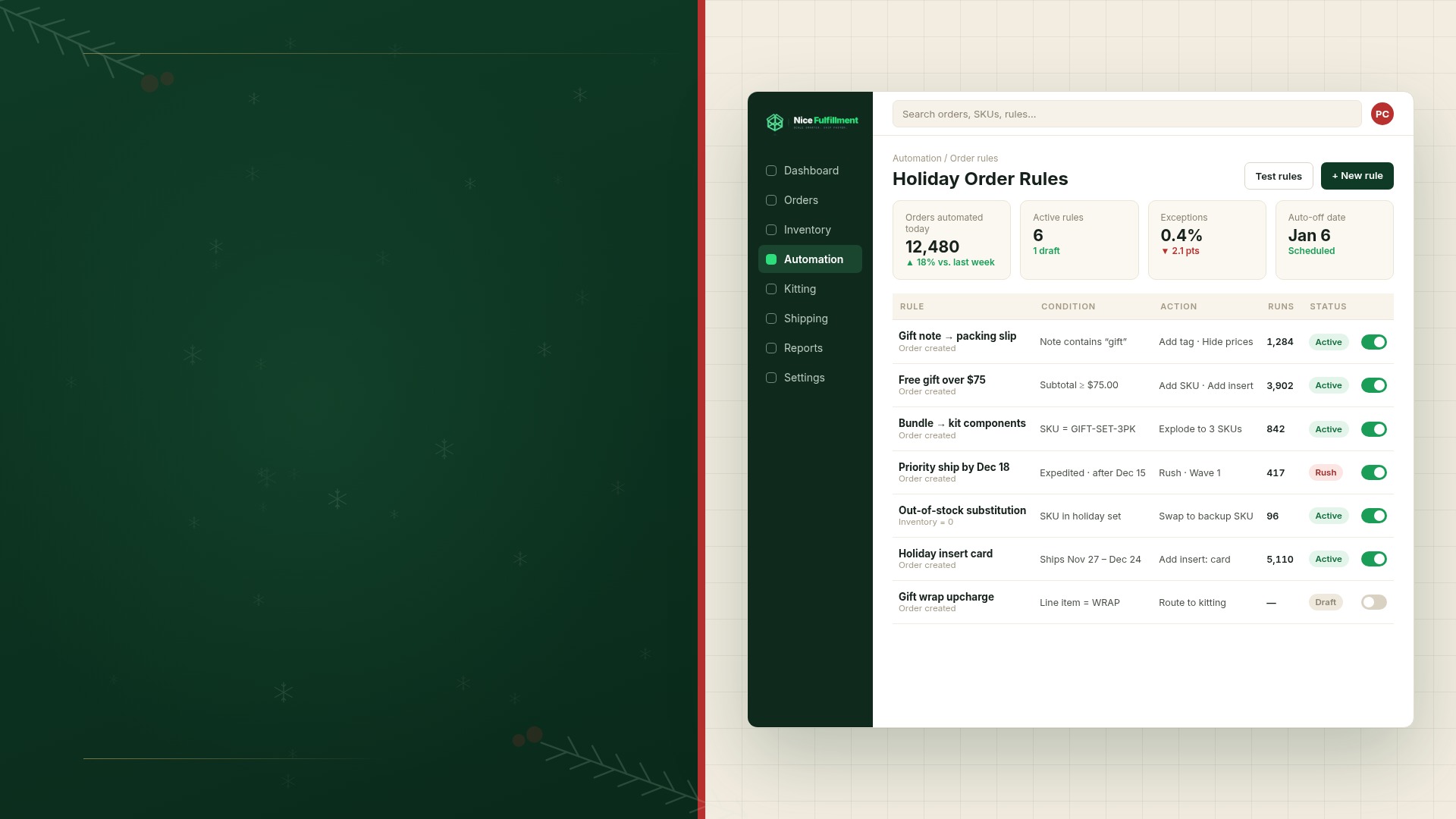
It starts with one email. "Can we add a free sample to orders over $50 this weekend?" Then another: "Ship anything with the gift box SKU in tissue." By Friday, your holiday promotion lives across six threads, two spreadsheets, and someone's memory.
That works at 200 orders a day. At Black Friday Cyber Monday (BFCM) volume, every exception becomes an error risk. The fix is order automation: turning those exceptions into rules now, so the warehouse runs your holiday playbook for you.
Most holiday exceptions fall into a handful of patterns, and each one can become a rule. In this guide, we're covering:
- · Why manual exceptions break at peak
- · Which order rules to set up now
- · How auto-bundling and substitutions work
- · How to prioritize expedited and VIP orders
- · How to test rules before volume hits
- · What to turn off after the holidays
Why do manual exceptions need to become rules before peak?
Every manual exception needs a rule before order volume spikes. Manual exceptions depend on a person catching the right order at the right moment. At peak volume, that person has less time per order and more exceptions to remember.
An order rule — the building block of order automation, sometimes called a trigger — replaces that memory with logic. It has two parts:
- · A condition: what has to be true about the order (a SKU, an order value, a ship-to state, a shipping method, a customer tag).
- · An action: what happens when the condition is met (add an item, print a note, route to a warehouse, raise the priority).
The rule runs when the order syncs to the warehouse, so a free sample, for example, is already on the pick list.
Brands often assume the warehouse "just knows" about a live promotion. If the warehouse system can't read it as a condition, it doesn't exist on the floor. So which promotions should you translate first?
Which order rules should you set up before BFCM?
The highest-value rules change what goes in the box or where it ships from. Four fit almost every brand running holiday promotions.
Gift notes
Rule
When an order includes a gift message, print it on a gift card or packing slip and hide prices.
When to use it
Any checkout with a gift option.
Example
A customer checks "This is a gift" and adds a note. The rule prints it on a gift card and uses a packing slip without prices.
Gift messages can arrive as an order note, a line-item property, or a custom attribute — depending on the storefront app. Shopify documents line item properties as the standard way to attach that kind of custom data to an order. If the rule reads the wrong field, notes go missing unnoticed.
Free gift with purchase
Rule
When an order meets a threshold, add a free gift SKU to the order at $0.
When to use it
Spend-based or product-based gift-with-purchase promotions.
Example
Orders with a subtotal of $75 or more get a 7-day sample pack of your best-selling greens powder.
Decide whether the threshold reads the subtotal before or after discounts. An $80 cart with a 10% code lands at $72, so match the rule to what your promo copy promises.
Inserts by SKU or order value
Rule
When an order contains a specific SKU or crosses an order value, add a printed insert.
When to use it
Product instructions, promo cards, or campaign “thank you” inserts.
Example
Orders with the new serum get a usage card; orders over $150 also get a January discount card.
Inserts tend to stack. An order that triggers three rules gets three cards, which may not fit the mailer. A rule hierarchy keeps only the highest-priority insert when space is tight.
Routing to the nearest warehouse
Rule
Send each order to the warehouse that reaches its ship-to address fastest.
When to use it
Inventory in two or more warehouses.
Example
Orders route to whichever warehouse is fewer shipping zones away, roughly splitting East and West Coast customers.
Routing rules should check stock first. If the closer warehouse is out of a SKU, the rule needs a fallback — like the other node or a split shipment. Our bi-coastal fulfillment guide covers the node setup in full.
That stock check gets harder when the product is a bundle.
How do auto-bundling and SKU substitution rules work?
Bundling and substitution rules bridge what a customer buys and what gets picked — keeping holiday sets shippable when one piece runs low.
Auto-bundling
Rule
When a bundle SKU is ordered, break it into its component SKUs for picking.
When to use it
Holiday sets and kits sold as a single listing.
Example
A “Holiday Pup Box” sells as one SKU but picks as a bag of treats, a chew toy, and a gift box.
A bundle's available quantity should come from its scarcest component: 500 bags of treats and 120 gift boxes means 120 sets. Brands that set bundle counts manually tend to oversell once the boxes run out. ShipHero's work order and kitting tooling is one example of how a WMS tracks component stock through an assembly step like this. If you're still finalizing which sets to run this year, our gift set kitting timeline covers planning them backward from BFCM.
Approved SKU substitutions
Rule
When a component drops below a set stock level, swap in a pre-approved alternative.
When to use it
Free gifts, samples, or bundle components the customer didn't pick.
Example
When the travel-size hydrating shampoo drops below 50 units, the rule substitutes the travel-size volumizing shampoo in gift-with-purchase orders.
Limit substitutions to items the customer didn't choose. Swapping a free sample's formula is usually fine; swapping the shade someone selected creates a return. And getting the contents right only helps if the order ships on time.
How do you prioritize expedited and VIP orders?
Priority rules should push expedited and VIP orders to the front. Without them, orders tend to ship first-in, first-out — which is fine until an overnight order waits behind 3,000 standard ones.
Expedited shipping priority
Rule
When an order’s shipping method is expedited, flag it for same-day pick and pack.
When to use it
Any time you offer 2-day, overnight, or guaranteed holiday delivery.
Example
Orders with “Express” or “Overnight” in the shipping method jump to the top of the pick queue.
Match the rule to the carrier's pickup time: an expedited order packed at 4:30 p.m. still misses a 4:00 p.m. pickup.
VIP customer priority
Rule
When an order comes from a tagged customer, raise its priority or add special handling.
When to use it
Loyalty tiers, wholesale accounts, or influencer and creator shipments.
Example
Customers tagged “VIP” ship ahead of standard orders with a handwritten-style note card.
Use priority sparingly. If half your orders carry the flag, it stops meaning much. And every rule adds a new way for orders to go wrong — which is why testing comes first.
How do you test order rules before BFCM?
Run test orders through every rule before it goes live, then audit real orders on its first day. Most errors come from conditions that read slightly differently than expected.
- · Test every condition. Place orders right at the threshold, just below it, and with a discount code applied.
- · Test rule combinations. One order with a gift note, a free gift, and expedited shipping shows how rules interact.
- · Test every sales channel. Your site, a marketplace, and a social commerce channel may pass data differently.
- · Review real orders on day one. Check pick lists, packing slips, and shipping methods on a sample that triggered each rule, plus a few that shouldn't have. If post-peak numbers tend to slip your mind, our 2025 peak data guide covers what to pull after the fact.
- · Name an owner for each rule. Someone should be ready to pause it mid-promotion.
Rules that pass testing still have a shelf life.
What holiday order rules should you turn off after the holidays?
Turn off every rule tied to a holiday promotion, date, or item that won't exist in January. Rules don't expire on their own, so a forgotten gift-with-purchase rule keeps adding $0 items long after the promo ends.
If your system allows it, set an end date on each rule when you create it.
Order rules turn BFCM into a playbook the warehouse can run
Every rule here moves a decision out of the busiest week and into a quieter one — and a decision made before the rush will always hold up better than one made in the middle of it.
The harder part is maintaining that logic: writing each rule, checking how they stack, testing across channels, and switching them off in January. Nice Fulfillment helps set up and manage those rules through our on-site account managers, with a deep library of order customization and automation triggers and instant channel syncing, so your holiday playbook runs from the first order.
Reach out to our team to see what you can automate before BFCM.